| Version 70 (modified by jazz, 14 years ago) (diff) |
|---|
hadoop4win 開發筆記
0.1.4 版
- 降低 HADOOP_HEAPSIZE - 因為記憶體不足的電腦會跑不動。(2010-11-19 ITRI)
- [BUG] /var/hadoop 與 /tmp/hbase-${user.name} 會產生在 C: 下,而非 hadoop4win 安裝目錄下。(2011-03-03 Hinet)
- 判斷 java process 的 PID script - 因為 jps 看到的 PID 跟 ps -ef 看到的 PID 不一樣。(2011-03-03 Hinet)
- 加入 ant 與 build.xml 好簡化程式設計步驟 - 參考步驟
0.1.5 版
- 0.1.5 alpha - 2011/05/03 :
- 改用 NSIS 撰寫 Windows 安裝程式。
- 新增「開始選單」與「反安裝程式」。
- 修改 hadoop4win-init 安裝流程:
- 自動產生 conf-pseudo 目錄內容,並將原本預設設定目錄移到 conf-local 中。
- 這個做法可以解決 Win7 先前遇到的權限問題。
- 0.1.5 新版想加入的功能
- NSIS 安裝檔
- [文件] NSIS 繁體中文版說明文件
- 在 Debian / Ubuntu 系列有 nsis 的套件,只是需要學習怎麼使用。
~$ sudo apt-get install nsis
- NSIS 安裝檔
2010-10-30
- [參考] 從 Re: Cygwin setup.exe via the cygwin shell 的討論可以看到一些參考的語法 (2010-02-03)
setup.exe -d -q -R 'c:\cygwin' -s 'http://mirrors.xmission.com/cygwin/' -l 'c:\cygwin\home\thrall' -P vim,bc
- [參考] Hadoop + HBase + Cygwin + Windows 7 x64 (2010-10-26)
- 測試讓 cygwin setup.exe 從 http://ftp.ntu.edu.tw/pub/cygwin/ 下載到 cygwin_mirror 目錄
REM 純下載 Cygwin Base 分類下的檔案
setup.exe -q -D -O -s http://mirror.mcs.anl.gov/cygwin -C base
REM 把 http 開頭的目錄搬到 cygwin_mirror
move http* cygwin_mirror
REM  用本地目錄 cygwin_mirror 安裝到 c:/hadoop4win
setup.exe -q -d -L -l %cd%/cygwin_mirror -R c:/hadoop4win
pause
2010-12-21
- 學習使用 EclipseNSIS
- [限制] 目前 EclipseNSIS 並不支援 Linux - 開發者覺得工程浩大,暫時不會改。
- [結論] 光安裝就有點麻煩,得先裝 Eclipse 3.5 sr1 版本,然後還有 NSIS 、EclipseNSIS Plugin 要裝。若只是要產生安裝檔,似乎有點工程太大。加上仔細看了一下介紹,似乎都要寫 NSIS Script 腳本,EclipseNSIS 只是多了 InstallOption 的介面設計工具罷了。所以還是改用指令好了~
- 在 Ubuntu 10.04 底下測試 NSIS 指令 - 其實只要找對範例程式,也不難寫啦~drbl-winroll 應該是用 nsExec 寫的。
~$ sudo apt-get install nsis
~$ cp /usr/share/doc/nsis/Examples/nsExec/test.nsi .
~$ makensis test.nsi

... 略 ...
Processed 1 file, writing output:
Adding plug-ins initializing function... Done!
Processing pages... Done!
Removing unused resources... Done!
Generating language tables... Done!

Output: "nsExec Test.exe"
Install: 2 pages (128 bytes), 3 sections (3144 bytes), 46 instructions (1288 bytes), 47 strings (946 bytes), 1 language table (198 bytes).
Datablock optimizer saved 8092 bytes (~13.4%).

Using zlib compression.

EXE header size:               48128 / 50688 bytes
Install code:                    987 / 6032 bytes
Install data:                   4046 / 27660 bytes
CRC (0x93CB145C):                  4 / 4 bytes

Total size:                    53165 / 84384 bytes (63.0%)
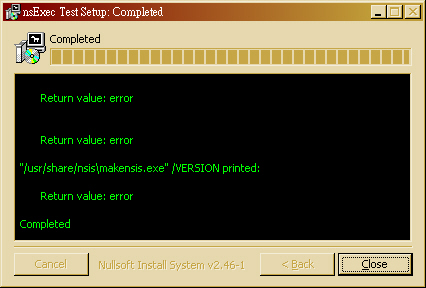
- 如果要設計網路安裝版,倒也可以用 NSISdl 這個 plugin 來開發。簡單寫一個測試範例,還算蠻簡單的。(注意:底下用 \$ 是為了配合 cat 語法,若直接貼程式碼請拿掉!)
~$ cat > NSISdl.nsi << EOF
Name "NSISdl Plugin Test"
OutFile "NSISdl.exe"

ShowInstDetails show

Section "Download Hadoop"
	NSISdl::download /TIMEOUT=30000 http://ftp.twaren.net/Unix/Web/apache//hadoop/core/hadoop-0.20.2/hadoop-0.20.2.tar.gz hadoop-0.20.2.tar.gz
	Pop \$0
	StrCmp \$0 "success" +3
		MessageBox MB_OK "Download failed: \$0"
		Quit
SectionEnd
EOF
~$ makensis NSISdl.nsi
- 產生出來的 NSISdl.exe 在 Windows 7 上執行的結果如下圖:


- [文件] 多重使用者身份問題:README.MultiUser.gz 這個文件說明了 NSIS 幫忙判斷使用者是否具備 Admin 或 PowerUser 權限的寫法。而 README.StartMenu 則說明了怎麼產生在開始選單的目錄。
~$ zcat /usr/share/doc/nsis/README.MultiUser.gz | less
~$ less /usr/share/doc/nsis/README.StartMenu
- 學習讀取 ini 設定檔 - [參考] /usr/share/doc/nsis/Examples/{FileFunc.nsi.gz, FileFunc.ini}
- 使用 ReadINIStr 這個語法,以 FileFunc.nsi 為例。
- 首先,第一步是找到 INI 檔案的路徑。第 17 行宣告 INI 這個變數。第 723~727 行,設定 INI 這個變數,並且讓它的內容等於編譯時提供的 FileFunc.ini。
- 流程上,透過 .onInit 這個函數宣告初始化流程要做的事情就是把 FileFunc.ini 拷貝到 $PLUGINSDIR 目錄中的暫存檔 $INI。
- 用 InitPluginsDir 這個語法設定 $PLUGINSDIR 目錄變數
- 用 GetTempFileName 這個語法會在 $PLUGINSDIR 目錄產生一個暫存檔,並回傳檔名存放於 $INI 中。
- 用 File 把 FileFunc.ini 拷貝存放到 $INI 的路徑去。
GetTempFileName 使用者變數(輸出) [暫存檔路徑]
File [/nonfatal] [/a] ([/r] [/x 檔案|通配符 [...]] (檔案|通配符) [...] | /oname=輸出路徑\檔案名稱 輸入路徑\檔案名稱)
 17 Var INI

723 Function .onInit
724         InitPluginsDir
725         GetTempFileName $INI $PLUGINSDIR
726         File /oname=$INI "FileFunc.ini"
727 FunctionEnd
- 接著,第 19 行宣告 STATE 變數,並於第 96 行使用 ReadINIStr 從 $INI 的 "[Field 1]" 這個區段(section)的某一項(entry)
ReadINIStr 用戶變量(輸出) INI檔案 區段 項
ReadINIStr user_var(output) ini_filename section_name entry_name
- 在 FileFunc.ini 中就定義了 "[Field 1]" 這一個區段(section),並定義了 State 這一項(entry)。
  5 [Field 1]
  8 State="  1. Locate"
 19 Var STATE
 96         ReadINIStr $STATE $INI "Field 1" "State"
- 4.8.1.45 XPStyle 預設為 off,可用的設定值為 on 或 off。設定安裝程式與反安裝程式是否使用 XP 外觀樣式。
2010-12-28
- Cygwin setup.exe 的參數列表:用 wine 跑 "setup.exe /?" 的結果
2010/12/28 12:30:20 Starting cygwin install, version 2.738
2010/12/28 12:30:20 io_stream_cygfile: fopen(/etc/setup/setup.rc) failed 2 No such file or directory
2010/12/28 12:30:20 io_stream_cygfile: fopen(/etc/setup/last-cache) failed 2 No such file or directory
2010/12/28 12:30:20 io_stream_cygfile: fopen(/etc/setup/last-action) failed 2 No such file or directory
2010/12/28 12:30:20 io_stream_cygfile: fopen(/etc/setup/net-method) failed 2 No such file or directory
2010/12/28 12:30:20 io_stream_cygfile: fopen(/etc/setup/net-proxy-host) failed 2 No such file or directory
2010/12/28 12:30:20 io_stream_cygfile: fopen(/etc/setup/net-proxy-port) failed 2 No such file or directory
2010/12/28 12:30:20 io_stream_cygfile: fopen(/etc/setup/last-mirror) failed 2 No such file or directory
2010/12/28 12:30:20 io_stream_cygfile: fopen(/etc/setup/extrakeys) failed 2 No such file or directory
2010/12/28 12:30:20 io_stream_cygfile: fopen(/etc/setup/chooser_window_settings) failed 2 No such file or directory
2010/12/28 12:30:20 Current Directory: Z:\home\jazz\work
2010/12/28 12:30:20
Command Line Options:
 -D --download                          Download from internet
 -L --local-install                     Install from local directory
 -s --site                              Download site
 -O --only-site                         Ignore all sites except for -s
 -R --root                              Root installation directory
 -P --packages                          Specify packages to install
 -C --categories                        Specify entire categories to install
 -p --proxy                             HTTP/FTP proxy (host:port)
 -q --quiet-mode                        Unattended setup mode
 -M --package-manager                   Semi-attended chooser-only mode
 -h --help                              print help
 -l --local-package-dir                 Local package directory
 -r --no-replaceonreboot                Disable replacing in-use files on next
                                        reboot.
 -X --no-verify                         Don't verify setup.ini signatures
 -n --no-shortcuts                      Disable creation of desktop and start
                                        menu shortcuts
 -N --no-startmenu                      Disable creation of start menu shortcut
 -d --no-desktop                        Disable creation of desktop shortcut
 -K --pubkey                            Path to extra public key file (gpg
                                        format)
 -S --sexpr-pubkey                      Extra public key in s-expr format
 -u --untrusted-keys                    Use untrusted keys from last-extrakeys
 -U --keep-untrusted-keys               Use untrusted keys and retain all
 -A --disable-buggy-antivirus           Disable known or suspected buggy anti
                                        virus software packages during
                                        execution.
Ending cygwin install
2010/12/28 12:30:20 AddAccessAllowedAce(, owner) failed: 1337
2010/12/28 12:30:20 AddAccessAllowedAce(, group) failed: 1337
2010/12/28 12:30:20 AddAccessAllowedAce(, everyone) failed: 1337
2010/12/28 12:30:20 AddAccessAllowedAce(, owner) failed: 1337
2010/12/28 12:30:20 AddAccessAllowedAce(, group) failed: 1337
2010/12/28 12:30:20 AddAccessAllowedAce(, everyone) failed: 1337
2011-04-11
- 嘗試排解 Windows 7 安裝 hadoop4win 的權限問題,但還是會發生 conhost 的錯誤.
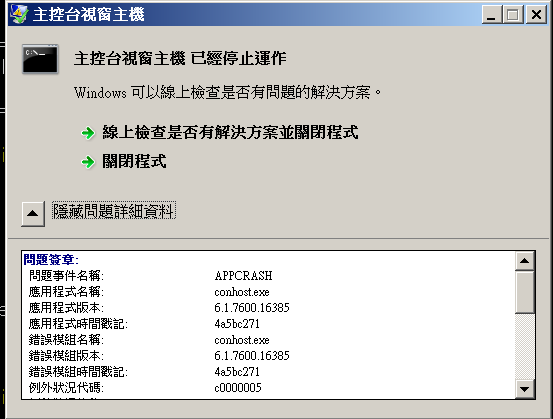
- Win 7的新特性:控制臺主機(ConHost.exe)

2011-04-15
- 直接從 Modern UI 範例開始學 NSIS ~
firefox file:///usr/share/doc/nsis/Docs/Modern%20UI/Readme.html#examples
- 首先,嘗試編譯範例 Basic.nsi
~$ cp /usr/share/doc/nsis/Examples/Modern\ UI/Basic.nsi .
~$ makensis Basic.nsi
- 這個範例蠻單純的,就是在指定安裝的目錄中放 Uninstall.exe

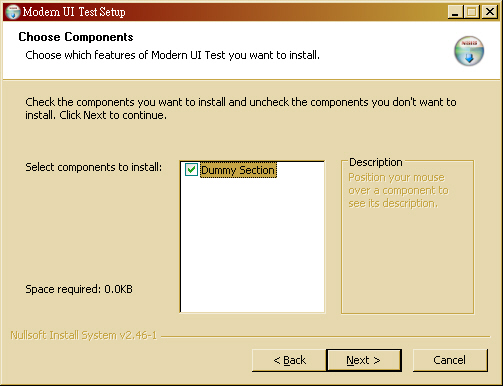

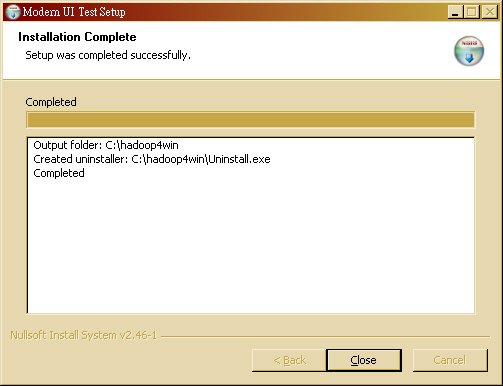
- 接著看 WelcomeFinish.nsi,跟 Basic.nsi 差別就只有四行:
!insertmacro MUI_PAGE_WELCOME
!insertmacro MUI_PAGE_FINISH
!insertmacro MUI_UNPAGE_WELCOME
!insertmacro MUI_UNPAGE_FINISH
~$ cp /usr/share/doc/nsis/Examples/Modern\ UI/WelcomeFinish.nsi .
~$ makensis WelcomeFinish.nsi


- 至於 HeaderBitmap.nsi 主要則增加兩行:
  !define MUI_HEADERIMAGE
  !define MUI_HEADERIMAGE_BITMAP "圖檔路徑"
~$ cp /usr/share/doc/nsis/Examples/Modern\ UI/HeaderBitmap.nsi .
~$ makensis HeaderBitmap.nsi
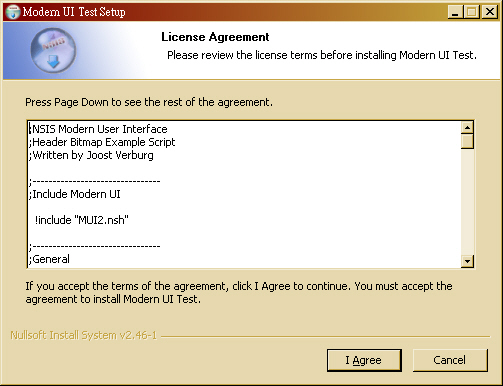
- 若要在開始選單產生目錄,StartMenu.nsi 加了幾個語法
  Var StartMenuFolder

  # 用 Registry 紀錄使用者設定的「開始」選單「目錄名稱」
  !define MUI_STARTMENUPAGE_REGISTRY_ROOT "HKCU"
  !define MUI_STARTMENUPAGE_REGISTRY_KEY "Software\Modern UI Test"
  !define MUI_STARTMENUPAGE_REGISTRY_VALUENAME "Start Menu Folder"

  # 顯示要使用 STARTMENU 的頁面
  !insertmacro MUI_PAGE_STARTMENU Application $StartMenuFolder

 # 把要在「開始」選單中處理的動作,寫在 MUI_STARTMENU_WRITE_BEGIN 跟 MUI_STARTMENU_WRITE_END 頁面中間
 !insertmacro MUI_STARTMENU_WRITE_BEGIN Application

    ;Create shortcuts
    CreateDirectory "$SMPROGRAMS\$StartMenuFolder"
    CreateShortCut "$SMPROGRAMS\$StartMenuFolder\Uninstall.lnk" "$INSTDIR\Uninstall.exe"

  !insertmacro MUI_STARTMENU_WRITE_END

 # 把要從「開始」選端中反安裝的動作,寫在 MUI_STARTMENU_GETFOLDER 之後。
  !insertmacro MUI_STARTMENU_GETFOLDER Application $StartMenuFolder

  Delete "$SMPROGRAMS\$StartMenuFolder\Uninstall.lnk"
  RMDir "$SMPROGRAMS\$StartMenuFolder"
~$ cp /usr/share/doc/nsis/Examples/Modern\ UI/StartMenu.nsi . ~$ makensis StartMenu.nsi
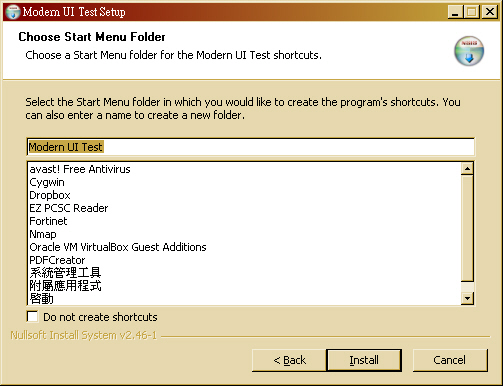
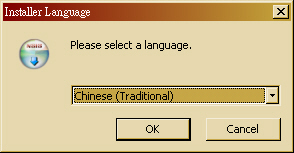
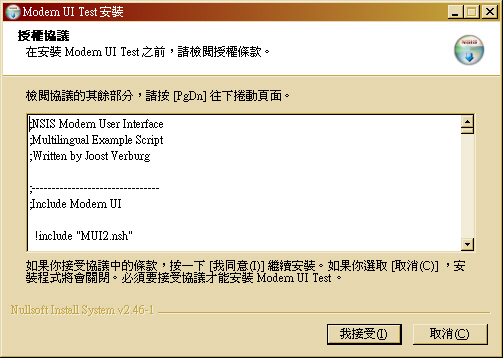
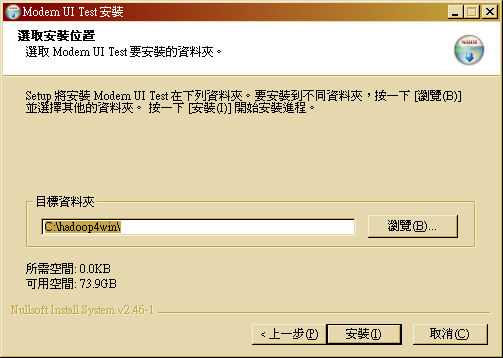
- 比較複雜的是 MultiLanguage.nsi,當然語法主要是加入
  # 用 Registry 紀錄使用者選擇的「語系」
  !define MUI_LANGDLL_REGISTRY_ROOT "HKCU"
  !define MUI_LANGDLL_REGISTRY_KEY "Software\hadoop4win"
  !define MUI_LANGDLL_REGISTRY_VALUENAME "Installer Language"

  # 加入不同語系的巨集,第一個是預設語系
  !insertmacro MUI_LANGUAGE "TradChinese"
  !insertmacro MUI_LANGUAGE "SimpChinese"
  !insertmacro MUI_LANGUAGE "English"

# 在 .onInit 安裝程式初始化的地方,加入多國語系顯示的巨集
Function .onInit
  !insertmacro MUI_LANGDLL_DISPLAY
FunctionEnd
# 在 un.onInit 反安裝程式初始化的地方,加入多國語系顯示的巨集
Function un.onInit
  !insertmacro MUI_UNGETLANGUAGE
FunctionEnd



2011-04-16
- 在 sunny 的 DRBLLiveHelper 原始碼看到 HM NIS EDIT: A Free NSIS Editor/IDE 這個專案。
2011-04-20
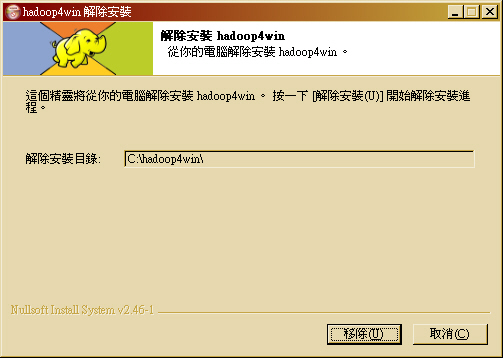
- 把上面看過的幾個範例程式:MultiLanguage.nsi、HeaderBitmap.nsi 跟 StartMenu.nsi 整合在一起。加入 nsExec 跟 NSISdl,撰寫網路安裝版雛型。
- hadoop4win Logo 製作:
- 語法:4.9.1.5 File - 說明要打包進安裝檔的檔案
- 語法:4.6.1.1 AddSize - 告知該 Section 需要多少硬碟空間



2011-04-21
- 實作 hadoop4win-setup-net 網路安裝版,並將程式碼放到 sourceforge 作 SVN 控管。
- http://hadoop4win.svn.sourceforge.net/viewvc/hadoop4win/
2011-04-26
- 由於 Cygwin 1.7.9-1 無法正常運行 wordcount 範例,因此把 hadoop4win-setup-net 網路安裝版的 Cygwin 降級為 1.5.25
- 透過 setup-legacy.exe --help 取得 Cygwin 1.5.25 的安裝參數
Starting cygwin install, version 2.738 Current Directory: E:\ Command Line Options: -D --download Download from internet -L --local-install Install from local directory -s --site Download site -O --only-site Ignore all sites except for -s -R --root Root installation directory -P --packages Specify packages to install -C --categories Specify entire categories to install -p --proxy HTTP/FTP proxy (host:port) -q --quiet-mode Unattended setup mode -M --package-manager Semi-attended chooser-only mode -h --help print help -l --local-package-dir Local package directory -r --no-replaceonreboot Disable replacing in-use files on next reboot. -X --no-verify Don't verify setup.ini signatures -n --no-shortcuts Disable creation of desktop and start menu shortcuts -N --no-startmenu Disable creation of start menu shortcut -d --no-desktop Disable creation of desktop shortcut -K --pubkey Path to extra public key file (gpg format) -S --sexpr-pubkey Extra public key in s-expr format -u --untrusted-keys Use untrusted keys from last-extrakeys -U --keep-untrusted-keys Use untrusted keys and retain all -A --disable-buggy-antivirus Disable known or suspected buggy anti virus software packages during execution. Ending cygwin install - 語法:4.9.14.3 DetailPrint - 顯示訊息到「安裝訊息列表框」
- 語法:4.9.14.14 SetDetailsPrint - 選擇只顯示到狀態列還是列表框
- 語法:nsExec::ExecToLog - 將 Exec 的執行結果顯示到安裝訊息列表框。
- 如何讓 CMD 執行的視窗最小化或在背景執行 - [參考] cmd.exe: how to starts a background process, run some things, stops background process
SET TASK=%RANDOM%-SELENIUM-SERVER-%RANDOM%
start "%TASK%" cmd /k start java -jar "path\selenium-server.jar"
ping -n 5 127.0.0.1 >NUL"
path\Gallio.Echo.exe" "path\MyAssembly.dll"
taskkill /T /FI "WINDOWTITLE eq %TASK%"
2011-05-02
- 應測試發現 Cygwin 1.5.28 版雖然可以正常執行大部分程式,可是無法正常運作 MapReduce( wordcount 範例),必須將舊版 Cygwin 的 mirror 改回 hadoop4win 0.1.4 版的 cygwin-mirror。
- 在 Linux 底下製作的完整版會出現解壓縮錯誤的問題,初步懷疑跟 Unix 與 DOS 的格式差異有關。

- 初步懷疑是 Unix 與 DOS 格式差異造成,但為了編譯方便性,改以 7zip 壓縮整個 cygwin-mirror 目錄,並增加 7z.exe 供安裝過程解壓縮用。
- <失敗> 使用 7zip 的方式雖可避開 cygwin-mirror 的問題,但仍會出現類似的解壓縮問題在解壓縮 jdk1.6.18.zip 時。

2011-05-03
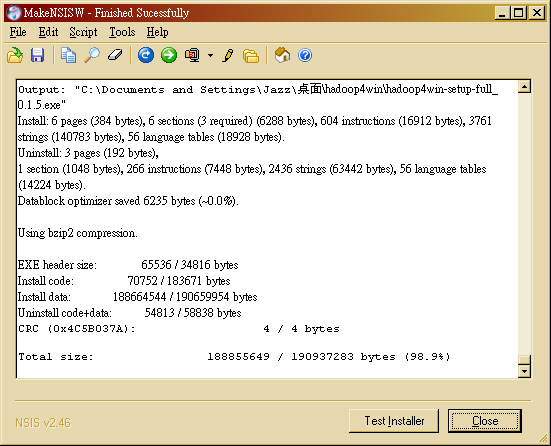
- 改於 Windows 上安裝 NSIS 進行編譯,初步確認問題是 Unix 與 DOS 格式造成的錯誤。下圖是使用 MakeNSISW 編譯成功的畫面:
- 進行 Windows XP 功能完整性測試 - 成功!!
- 進行 Windows 7 功能完整性測試 - 失敗!!
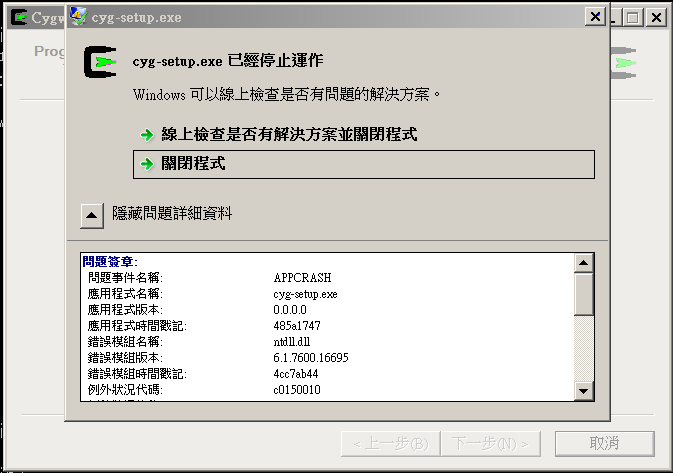


2011-05-15
- <備忘> NSIS 如何新增 Windows 環境變數
- 若是要安裝 Eclipse 的話,就必須把 JDK 的路徑加到環境變數 PATH 中。
2011-05-24
- (2011-05-24)
- Hadoop in Azure - 介紹如何在 Windows Azure 平台上佈署 Hadoop 叢集。看起來跟 HADOOP-6767 "Patch for running Hadoop on Windows without Cygwin" 這個 patch 的作法類似,都是透過 Java Service Wrapper 有關。只是 HADOOP-6767 用的是 GPL / Commercial 混合授權的 JSW (Java Service Wrapper),而這篇文章的作者用的是YAJSW(Yet Another Java Service Wrapper)。但是基本精神很清楚,就是盡可能地用 Windows 的 CMD 或 BAT 來取代原本 hadoop 這隻 bash shell script。如此就可以不依賴 Cygwin 環境,並且把 Hadoop Service 以 Windows Service 方式跑在背景。
2011-06-23
- <備忘> Running Hadoop on Windows
- 本文提到設定 /etc/hosts 的方法是放在 c:\windows\system32\drivers\etc\hosts
2011-07-07
- <備忘> 使用 favicon.ico Generator 來產生不同專案的 icon 檔 (參考:2009-02-01)
- 近期覺得 Pig 跟 Hive 也挺好用的,而且又是單機版程式,所以可以放入 hadoop4win 的範疇。
2011-10-04
- <備忘> Windows PowerShell 的新功能
- 由於 Windows 7 的支援不佳,或許該考慮使用 PowerShell 來取代 Cygwin 的功能
2011-12-07
- <備忘> Getting Started with Apache Hadoop 0.23.0 (2011-12-04)
2012-01-02
- <備忘> Apache Hadoop On Windows - 微軟官方 Technet 的技術文件,說明如何在不同的 Windows 平台上架設 Hadoop
- Apache Hadoop on Windows Azure - MSDN 部落格說明在 Windows Azure 上執行 Hadoop 的 Step-by-Step
2012-01-05
- <備忘> Starting the HBase Server from Eclipse
- 這篇文章裡面提到用 Eclipse 搭配一些類別,就可以在 Windows 底下搭配 Cygwin 啟動 HBase 的方式,還會有 Windows 背景運行的圖示在系統列,挺有趣的。


2012-01-23
- <備忘> Latest step by Step Installation guide for dummies: Nutch 0.9 - 在 Cygwin 環境中搭建 Nutch 0.9 版本的步驟
0.1.6 版
- 0.1.6 新版想加入的功能
- 整合 Eclipse 開發工具
- 更新 Hadoop、HBase 版本 - 考慮置放一個檔案於網站,以免網路安裝版本一段時間後便無法正常運作。
- 加入切換 standalone mode 與 psudo-distributed mode 的 script (2011-03-03 Hinet)
- 預設 standalone mode 的對應 script 與設定檔修改
2012-03-09
- 由於 trac 的 svn 裡有 hadoop4win-setup 目錄,而 sourceforge 的 svn 紀錄是新的,所以想試試看能否合併。
- [參考] SourceForge 的 SVN 匯入文件有提到 Filtering the dump file (optional)
- [參考] SVNBOOK 也有提到 Filtering Repository History
- 採用 SVNBOOK 的步驟,首先把 hadoop4win 的部份獨立成一個 Repository
jazz@Wdebian:~/trac_pool/trac_pool/grid$ svnadmin dump svnroot/ > grid_svn_dumpfile
.......
* Dumped revision 248.
jazz@Wdebian:~/trac_pool/trac_pool/grid$ svndumpfilter include --drop-empty-revs --renumber-revs hadoop4win-setup <  grid_svn_dumpfile > hadoop4win_dumpfile
jazz@Wdebian:~/trac_pool/trac_pool/grid$ svnadmin create hadoop4win
jazz@Wdebian:~/trac_pool/trac_pool/grid$ svnadmin load --ignore-uuid hadoop4win < hadoop4win_dumpfile
........
------- Committed revision 30 >>>
jazz@Wdebian:~/trac_pool/trac_pool/grid$ rm grid_svn_dumpfile hadoop4win_dumpfile
jazz@Wdebian:~/trac_pool/trac_pool/grid$ mv hadoop4win ~/hadoop4win_trac
- 做到這一步,我們可以拿到一個只有 hadoop4win-setup 這個目錄的 svnroot。(這裡我多用了 --drop-empty-revs 跟 --renumber-revs 兩個參數,如此可以讓原本 248 個 changeset 的 grid repository 過濾成只有 30 個 changeset 的 hadoop4win repository.
- 根據 sourceforge 的說明,可以用 rsync 方式取回
jazz@Wdebian:~$ mkdir -p hadoop4win_sf
jazz@Wdebian:~$ cd hadoop4win_sf/
jazz@Wdebian:~/hadoop4win_sf$ rsync -av hadoop4win.svn.sf.net::svn/hadoop4win/* .
jazz@Wdebian:~/hadoop4win_sf$ cd
jazz@Wdebian:~$ svnadmin dump hadoop4win_sf/ > hadoop4win_sf_dumpfile
..........
* Dumped revision 15.
jazz@Wdebian:~$ svnadmin load --ignore-uuid hadoop4win_trac/ < hadoop4win_sf_dumpfile
..........
------- Committed new rev 45 (loaded from original rev 15) >>>
- 做到這一步,算是完整地將整個專案 SVN 合併成一個。好在時間點兩個是相互錯開的,不然還真不知道怎麼根據時間點順序做合併呢!
- 接著把這個 SVN repository 用 svnadmin dump 指令先產生一個 hadoop4win_dumpfile 的檔案。然後 scp 到 shell.sf.net
jazz@Wdebian:~$ svnadmin dump hadoop4win_trac/ > hadoop4win_dumpfile
....
* Dumped revision 45.
jazz@Wdebian:~$ scp hadoop4win_dumpfile jazzwang,hadoop4win@shell.sf.net:.
- 登入 shell.sf.net
jazz@Wdebian:~$ ssh -t jazzwang,hadoop4win@shell.sf.net create
[jazzwang@shell-24009 ~]$ adminrepo --checkout svn
[jazzwang@shell-24009 ~]$ rm -rf /svnroot/hadoop4win/*
[jazzwang@shell-24009 ~]$ svnadmin create /svnroot/hadoop4win
[jazzwang@shell-24009 ~]$ svnadmin load --ignore-uuid /svnroot/hadoop4win/ < hadoop4win_dumpfile
[jazzwang@shell-24009 ~]$ adminrepo --save svn

**** Ignoring the contents of the hooks directory (hooks are managed via the web) ****

Save and unlock the svn repository for hadoop4win? [ny] y
- 這樣就算是完整把整個開發過程移植到 sourceforge 去啦!!!!大功告成!!!
- 同步上去以後,ViewCV 的結果是正確的,不過 trac 不正確。出現底下的錯誤訊息,只好請 sourceforge 管理員幫忙了~開單
Warning: Can't synchronize with the repository (The 'repository_dir' has changed,
a 'trac-admin resync' operation is needed.). Look in the Trac log for more information.
2012-03-12
- 有讀寫權限取出 sf.net SVN repository 的指令:
~$ svn co https://hadoop4win.svn.sf.net/svnroot/hadoop4win hadoop4win
- 線上查 Hadoop4Win Trac SVN 歷史紀錄
2012-06-06
- Changes
- updated for hadoop, hbase, ant, pig and hive
- upgrade to hadoop 1.0.3
- upgrade to hbase 0.92.1
- upgrade to pig 0.10.0
- upgrade to hive 0.8.1
- add make-release.sh
- for core-developers on Linux to build source package for Windows
- add VERSION
- an notation of package version
- add configure.bat
- for anyone who would like to build their own setup files on Windows
2012-06-07
- Changes
- add files/apt-cyg
- for upgrade in future
- modified my_packages/hadoop/bin/hadoop4win-init
- change JDK from Sun JDK 6 to Open JDK 7
- modified hadoop4win-full.nsi
- BUGFIX: change pig version
- add -P option for cygwin setup.exe to add needed packages
- fix JDK path to openjdk-7-b146-windows-i586-20_jun_2011.zip
- modified configure.bat
- add wget package
2012-06-11
- Changes
- modified my_packages/hbase/bin/start-hbase
- modified my_packages/hadoop/bin/start-hadoop
- fix issue: jps of JDK 1.0.6 update 21 could not list java process start with cygstart
- modified my_packages/hadoop/bin/hadoop4win-init
- HADOOP_HOME is depricated since 1.0.3
- set hadoop.tmp.dir with cygpath
- add apt-cyg
- do not create folder for datanode for building windows hadoop cluster
- add conf-full and its related configuration files
- link /cygdrive/${DRIVE}/var/hadoop to /var/hadoop
- modified hadoop4win-full.nsi
- add apt-cyg
- openjdk 7 could not list java process with jps (maybe it's the same issue of listed above)
- modified configure.bat
- fixed path of cyg-setup.exe
2012-07-19
- modified hadoop4win-full.nsi
- change from hadoop 1.0.3 back to hadoop 0.20.2 since 1.0.3 could not chmod ${hadoop.tmp.dir}/mapred/ttprivate
- modified my_packages/hadoop/bin/hadoop4win-init
- add back $HADOOP_HOME for hadoop 0.20.2
- add files/download.sh
- for downloading package files for hadoop4win-full.nsi
- modified make-release.sh
- remove make-release.sh from the release zip file
Attachments (28)
- 10-12-21_NSISdl_complete.png (14.5 KB) - added by jazz 16 years ago.
- 10-12-21_NSISdl_result.png (13.3 KB) - added by jazz 16 years ago.
- 11-04-15_nsExec_Test.jpg (71.5 KB) - added by jazz 15 years ago.
- 11-04-15_MUI_Basic_1.jpg (96.8 KB) - added by jazz 15 years ago.
- 11-04-15_MUI_Basic_2.jpg (96.6 KB) - added by jazz 15 years ago.
- 11-04-15_MUI_Basic_3.jpg (95.5 KB) - added by jazz 15 years ago.
- 11-04-15_MUI_Basic_4.jpg (75.2 KB) - added by jazz 15 years ago.
- 11-04-15_MUI_Welcome.jpg (114.0 KB) - added by jazz 15 years ago.
- 11-04-15_MUI_Finish.jpg (101.2 KB) - added by jazz 15 years ago.
- 11-04-15_MUI_HeaderBitmap.jpg (99.7 KB) - added by jazz 15 years ago.
- 11-04-15_MUI_StartMenu.jpg (104.3 KB) - added by jazz 15 years ago.
- 11-04-15_MUI_MultiLang_1.jpg (31.6 KB) - added by jazz 15 years ago.
- 11-04-15_MUI_MultiLang_2.jpg (101.8 KB) - added by jazz 15 years ago.
- 11-04-15_MUI_MultiLang_3.jpg (91.9 KB) - added by jazz 15 years ago.
- 11-04-15_MUI_MultiLang_4.jpg (95.4 KB) - added by jazz 15 years ago.
- 11-04-15_MUI_MultiLang_5.jpg (57.6 KB) - added by jazz 15 years ago.
- 11-04-15_MUI_Uninstall.jpg (69.7 KB) - added by jazz 15 years ago.
- 11-04-20_hadoop4win.png (84.4 KB) - added by jazz 15 years ago.
- 11-04-20_hadoop4win-nsis.png (6.1 KB) - added by jazz 15 years ago.
- 11-04-20_hadoop4win-setup-net.jpg (76.0 KB) - added by jazz 15 years ago.
- 11-04-20_hadoop4win-unsetup.jpg (77.4 KB) - added by jazz 15 years ago.
- cygwin-1.5.25.log (2.7 KB) - added by jazz 15 years ago.
- 11-04-26_hadoop4win_size.png (421.1 KB) - added by jazz 15 years ago.
- 11-04-11_win7_conhost_error.png (22.6 KB) - added by jazz 15 years ago.
- 11-05-02_decompress_error.jpg (87.9 KB) - added by jazz 15 years ago.
- 11-05-03_MakeNSIS_Win32.jpg (134.9 KB) - added by jazz 15 years ago.
- 11-05-03_win7_cyg-setup_error.png (25.6 KB) - added by jazz 15 years ago.
- 13-07-01_hive_cygwin.png (19.8 KB) - added by jazz 13 years ago.